 Cadigence
Your review comments belong on the drawing, not in email.
Reviewers mark up and sign off in the browser. Every comment stays pinned to the exact spot, so the designer sees it land on their drawing in AutoCAD, jumps to it, and fixes it. Cadigence keeps the whole approval trail, and never writes to your DWG.
Early access · invite-only · onboarding a limited number of firms now.

One loop, from submit to sign-off
A comment travels from the reviewer’s browser to the designer’s AutoCAD drawing and back, pinned to the exact spot and tracked every step, until the drawing is fully approved.
Submit from AutoCAD
The designer submits from the AutoCAD plugin, which turns the drawing into a review PDF. The original DWG never leaves their machine, and it locks so nothing changes mid-review.
Review in the browser
The manager and other reviewers open that PDF in their browser and pin each comment to the exact spot. No AutoCAD, no install.
Comments land on the drawing
Every comment appears pinned on the designer’s real AutoCAD drawing. They jump to each one, fix it, and mark it resolved, without leaving their seat.
Approved & logged
Each level signs off and passes to the next on its own. Once fully approved the drawing locks, and every step is in the audit trail.
Made for the disciplines that live in AutoCAD
Your reviews happen everywhere except on the drawing.
A review today is spread across email threads, chat messages, and marked-up PDFs. None of it lives on the live drawing, and nothing ties each comment to the spot or tracks whether it was fixed, so things slip through and reviews stall.
The markup is a one-way snapshot
You mark up a PDF and send it back, but it’s cut off from the live drawing and the task. Nothing shows which comments are still open or already resolved, so items slip and get re-checked by hand.
Drawings stall in inboxes
A two-hour review takes three days, because the drawing is buried in someone’s inbox and nobody can see it’s stuck, or who’s holding it up.
Your record is scattered across inboxes
The emails exist, but the proof is spread across threads, file versions, and people who have moved on. Proving which drawing was approved, and when, means hunting through months of inboxes.
Not another markup app. A different way to review
Four ideas separate Cadigence from marking up a PDF and emailing it back.
Feedback on the drawing
Every comment sits on the exact spot it refers to, so there’s no “which detail did you mean?” and no email or PDF round-trips.
Zero disruption
Designers stay in AutoCAD, the tool they use every day. Nothing new to learn, and Cadigence never writes to your DWG.
Structured sign-off
Each level has a defined authority, such as technical check, engineering approval, or client acceptance, and hands off on its own.
Complete audit trail
Who flagged what, when, how it was resolved, and who signed off, recorded append-only, ready when a client asks a year later.
An AutoCAD plugin and a web portal, one shared record
The plugin is for the people who draw and check. The web portal is for everyone who manages, approves, or accepts the work.
Submit, then see every comment on your drawing
Designers submit a drawing for review in a couple of clicks, and the plugin turns it into a review PDF. When the reviewer’s comments come back, they land right on the drawing in AutoCAD, pinned to the exact spot. Filter to the must-resolve items, the ones that block approval, first, jump to each one, fix it, and mark it resolved without leaving your seat.
- Reviewer comments pinned on your actual drawing
- Jump straight to each must-resolve spot
- Mark comments resolved, then resubmit in place
- The plugin never writes to your DWG file
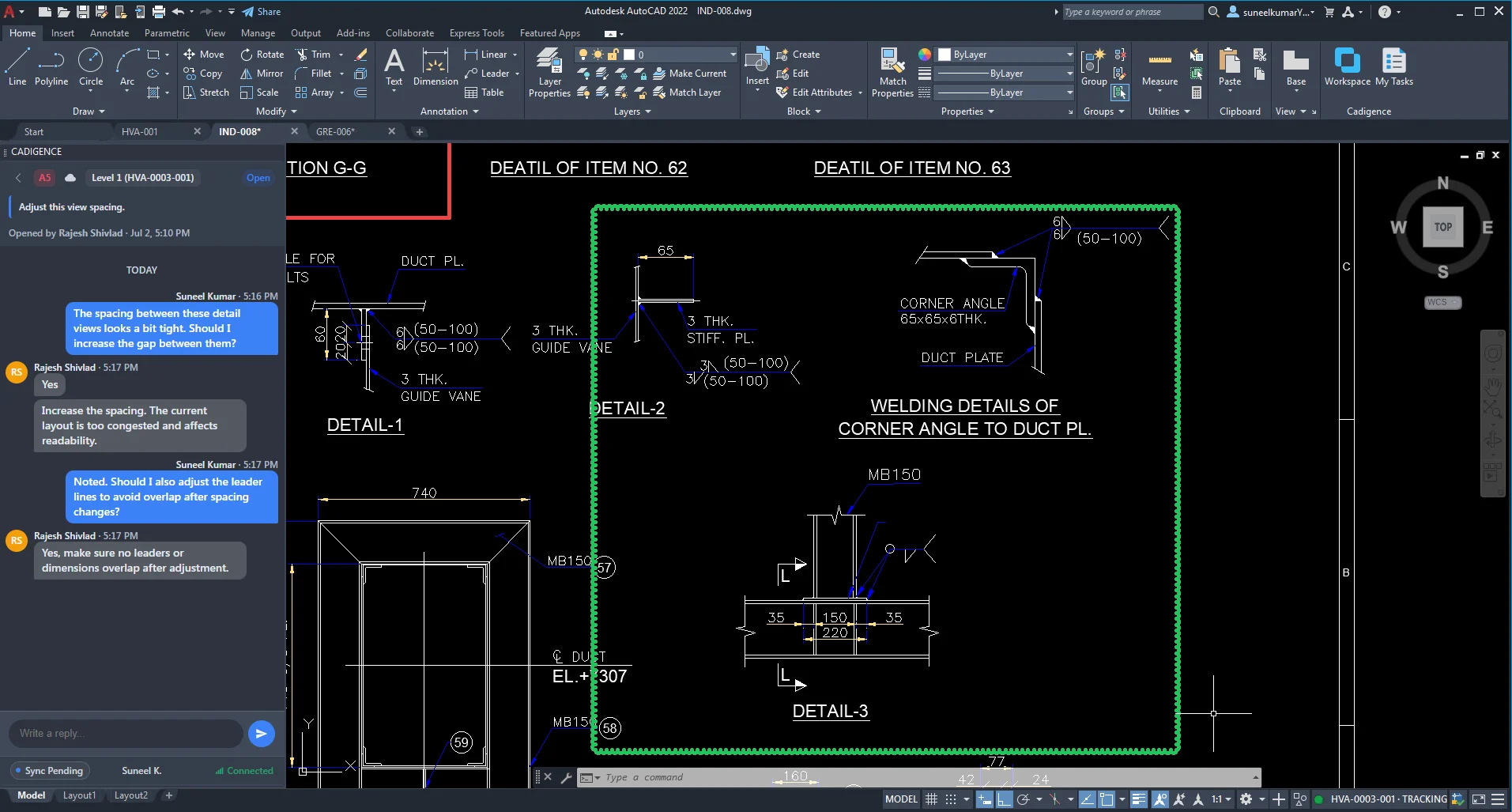
Mark up the drawing and sign off, all in the browser
Checkers, approvers, managers, and clients never touch AutoCAD. They open the review PDF in the browser and mark up the exact spots that need work with clouds, arrows, rectangles, text, and highlights, tagging each comment must-resolve or advisory. Then they approve it or send it back. The same portal holds the review queue, the approval pipeline, dashboards, analytics, and the audit log.
- Markup tools that pin every comment to the spot
- Must-resolve and advisory severity on each comment
- The approval pipeline with the authority at each level
- Approve or return for revision in one click
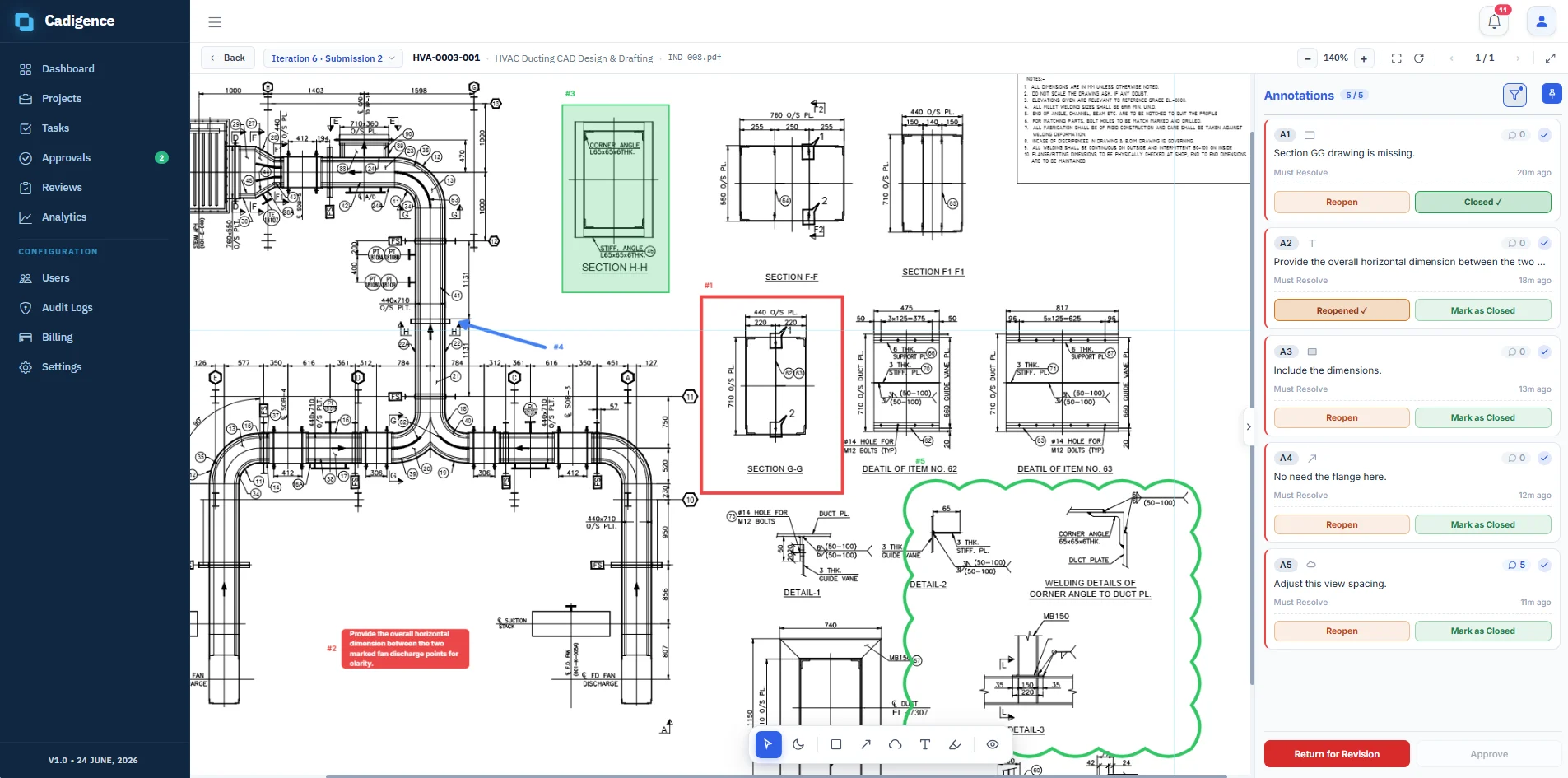
The whole review, without leaving AutoCAD
Designers never open a browser. Everything happens in one panel docked inside AutoCAD: time tracking, the reviewer’s comments, and the final sign-off.
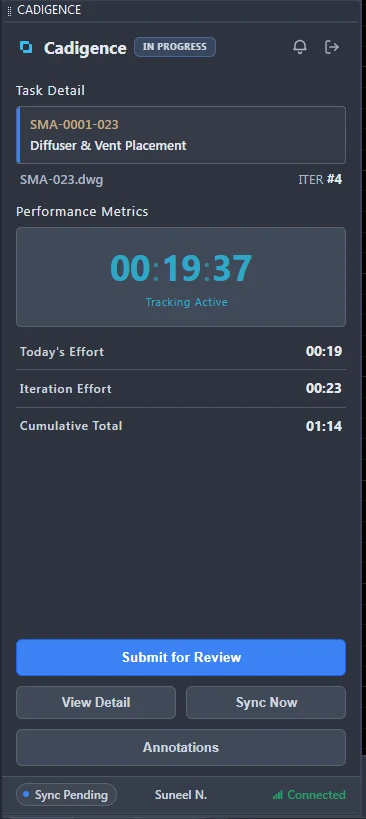
Time tracks itself
Open a drawing and just design. Cadigence counts only the time you spend actively working on it, and the clock pauses the moment you switch away or leave AutoCAD, so the hours are real.
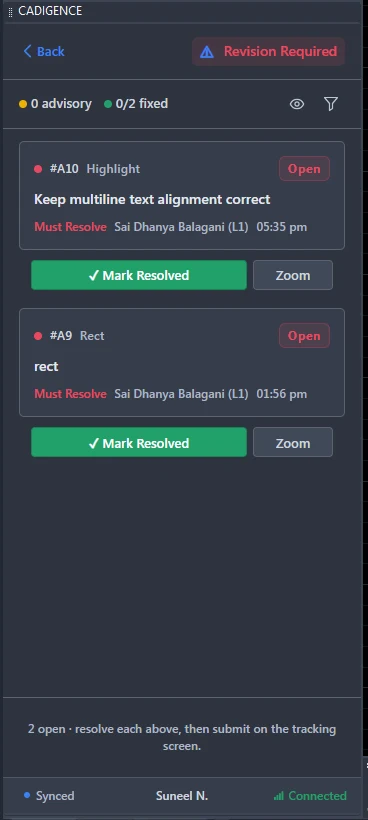
Comments land in AutoCAD
The reviewer’s must-resolve and advisory comments arrive right in the panel. Jump to each spot on the drawing, fix it, and mark it resolved.
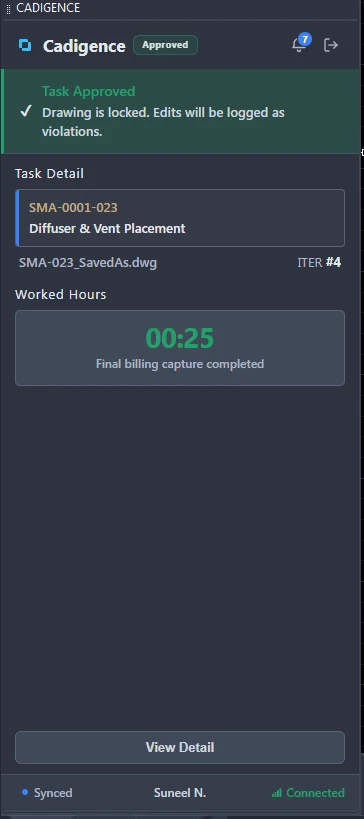
Approved, and locked
When the last level signs off, the task is approved and the drawing locks. Any later edit is flagged as a violation, and the final hours are captured.
A look inside the web portal
Everything the reviewers, managers, and clients touch lives in the browser, from marking up the drawing to the approval pipeline, dashboards, analytics, and the final audit log.

Mark up the drawing, right in the browser
Reviewers open the review PDF in the browser and pin each comment to the exact spot with clouds, arrows, rectangles, text, and highlights, every one tagged must-resolve or advisory, with its own thread. No AutoCAD needed.

Review detail and approvals
In the web portal, the full review of one drawing: the approval pipeline, each level’s sign-off, and every comment tagged must-resolve or advisory.

Review dashboard
The review status of every drawing across projects, with the level it’s on and who has it.

Manager dashboard
Active projects, approvals waiting on you, CAD hours, weekly trends, and tasks by status, all on one screen.

Analytics
CAD hours, median turnaround, reopen rate, on-time approval, and violations, broken down by project and by designer.

Audit log
Every submission, approval, level hand-off, and revision, each with a timestamp and the person who did it. Entries are added, never edited or deleted.
Want this running on your own drawings? A 20-minute walk-through of a full review cycle, no pressure, no setup on your side.
Request early accessA review system, not just a markup tool
Multi-level approval, built in
Set up 1 to 5 review levels, pick from ready-made templates, give each level its own authority type, swap in a stand-in reviewer, and let every drawing hand off automatically up the chain.
Comments & markup
Cloud, rectangle, arrow, text, and highlight tools. Each comment carries a severity and stays pinned to the drawing, with its own reply thread.
Automatic time tracking
The plugin records the time you spend actively working on each drawing and pauses when you switch away or leave AutoCAD, with iteration counts, hours, and a unique code per task.
Analytics
Reopen rate, iteration impact, approval turnaround, and violations, filtered by client, project, manager, and designer, with CSV and Excel export.
Sign-in & access
Secure email sign-in with role-based access for designers, checkers, approvers, and managers. Google and Microsoft single sign-on are on the roadmap. Runs on full AutoCAD 2021 and later on Windows.
Drawing integrity, end to end
The plugin never writes to your DWG. Drawings lock during review, any change to a locked drawing is flagged as a violation, and every submission, approval, and revision lands in an append-only audit log you can export to Excel.
One place for everyone on the drawing
Designers
Every comment is pinned to the drawing, so you can jump to the exact spot, fix it, and resubmit. Handle the must-resolve items first and leave the advisory ones for later.
Checkers
Open the review PDF in the browser and mark up the exact spots with familiar tools, then send all your comments at once with your decision to approve or return it. No AutoCAD needed.
Approvers
Sign off in the browser with the full comment history in front of you. No plugin to install.
Project managers
See where every drawing stands at a glance and quickly spot the ones that are stuck and who has them.
Quality leads
Know that approved drawings stay approved. Cadigence locks each drawing once it’s signed off, and flags any later change as a violation, so you can see if an approved drawing was modified, and who did it.
Clients
Review and accept the drawing from the browser with the full history in view. Client acceptance is recorded in the audit log.
You pay for designers. Reviewers are free.
Pricing is simple and seat-based: ₹1,800 per designer per month, and every manager, approver, and client reviews at no charge. Early-access firms lock a founding rate of ₹1,200 per designer per month. See full pricing and examples.
the people drawing in AutoCAD Reviewers & clients free
your whole sign-off chain, no charge Monthly or annual
adjust your seats as the team grows
Bluebeam is a PDF markup tool. Cadigence runs the whole review.
Cadigence gives you the markup you need to review a drawing, clouds, arrows, boxes, text, and highlights, and adds what a general-purpose PDF tool is not built for: multi-level approval, comment tracking, a tamper-evident record, and AutoCAD-native submission that never changes your DWG. See how they compare, point by point.
Your original drawing stays yours
We are careful with your files. Here is exactly what Cadigence does, and does not do, with your drawings.
We never change your DWG
The plugin reads your drawing to create a PDF for review. It never writes anything back to your DWG file, so your original stays exactly as you saved it.
Only a PDF is shared
The one thing uploaded to Cadigence is a PDF of the drawing you submit for review. Your editable DWG and your other project files stay on your computer.
Encrypted in transit
Everything travels over HTTPS. Each uploaded PDF is fingerprinted with a SHA-256 hash, so you can tell if a file has changed.
Private by default
Drawings are stored outside the public part of the site. They can only be opened by signed-in users who have access to that project.
Append-only audit log
Every submission, comment, approval, and revision is recorded with a server timestamp. Entries are added, never edited or deleted after the fact.
Secure sign-in
Sign in with email and password. Passwords are stored only as a salted hash, and accounts lock automatically after repeated failed attempts. Google and Microsoft single sign-on are on the roadmap.
Common questions
Cadigence is in early access and invite-only right now, and firms who join lock our founding rate. Request early access and we’ll set up a walk-through for your team.
No. The plugin reads your drawing to create a PDF for review. It never writes anything back to your DWG file, so your original drawing stays exactly as you saved it.
Only a PDF of the drawing you submit for review, plus the review data such as comments, replies, and approvals. Your editable DWG and your other project files stay on your computer.
The full version of AutoCAD 2021 and later on Windows. AutoCAD LT and the Mac version are not supported, because the plugin needs the full version.
No. Reviewers (checkers, approvers, and managers) and clients do everything in the web portal from any browser: they mark up the review PDF, read the comments, and approve it or send it back. Only designers use the AutoCAD plugin, to submit drawings and see the comments land on their drawing.
In the browser, on the review PDF, not in AutoCAD. When a designer submits a drawing, Cadigence creates a review PDF of it. Reviewers open that PDF in the web portal and pin each comment to the exact spot. The designer then sees those same comments land on their drawing back in AutoCAD. Reviewers never open AutoCAD or change your DWG.
Bluebeam is a general-purpose PDF markup tool; Cadigence is purpose-built to run a drawing through review and approval. It gives you the markup you need to review, then creates the review PDF automatically when the designer submits, keeps each comment tagged and tracked until it is resolved, runs the drawing through your approval levels, locks it once approved, and saves every step in an audit log, none of which a PDF markup tool does. See the full Cadigence vs Bluebeam comparison for a side-by-side breakdown.
Every comment gets a tag. Must-resolve means the designer has to fix it before the drawing can move forward. Advisory is helpful feedback that does not block approval. This keeps designers focused on what really matters.
It is automatic, and it counts only real working time. While you have the drawing open and active in AutoCAD, the plugin records your effort. The moment you switch to another drawing, leave AutoCAD, or stop working, tracking pauses, so idle time is never added to your hours. There are no timers or timesheets. Tracking also stops when you submit for review, and does not run after approval.
Yes. You can begin with a single approver and add more levels, such as a checker, an approver, and a client, whenever you are ready. Review pipelines support 1 to 5 levels.
No. You pay only for designer seats. Managers, approvers, and clients review for free.
Get your reviews back onto the drawing
See Cadigence run a full review cycle on drawings like yours, from the first pinned comment to a signed-off, tamper-evident record. We’re onboarding a limited number of firms.